For the last decade, we've been using AI the same way people used to use the Yellow Pages — flip to the right section, get a list of options, then go do the actual work yourself.
That's ending. Faster than most people expected.
Samsung's February 2026 Unpacked event made plenty of noise about hardware. The Privacy Display. The APV codec. The lightest Ultra they've ever built. But the word that kept coming up — in the keynote, in the breakout rooms, in every post-event breakdown — wasn't a camera spec or a chip number.
It was "Agentic AI."
If you're not sure what that means, you're not alone. The term is everywhere right now and almost nowhere is it explained in plain English. So here's an attempt to fix that — plus two step-by-step workflows you can actually use this week.
Assistant vs. Agent:
Here's the Actual Difference
Classic Siri. Classic Google Assistant. Alexa. These are, when you strip the marketing away, very sophisticated remote controls.
You give them a command, they execute that command. "Set a timer for ten minutes." Timer set. "Search for flights to London." Here are some results — good luck with the rest.
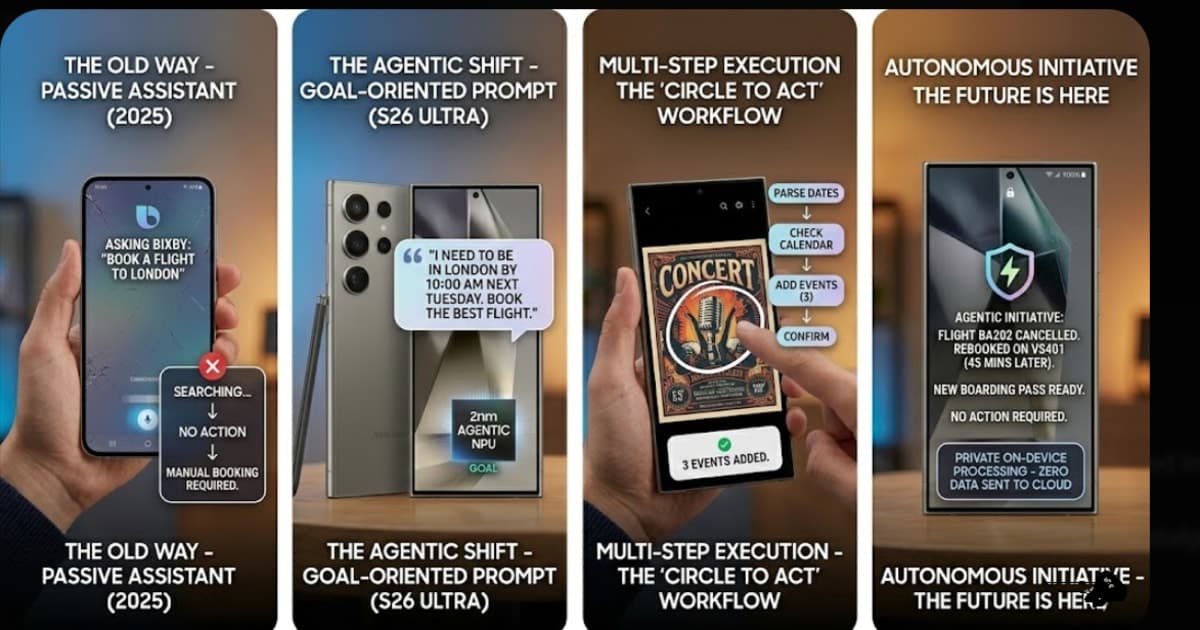
Ask a classic assistant to book you a flight and it opens a browser. You still do the booking. It hits a wall somewhere between understanding your request and actually doing anything about it — because it was never built to take initiative, only to respond.
An agentic system works differently. You give it a goal, not a command. It figures out the steps.
Tell it: "I need to be in London by 10 AM Tuesday — book the best flight."
It doesn't search. It goes. It checks your calendar for conflicts, pulls your saved home airport and seating preferences, hits the airline booking API, picks the optimal flight, generates a payment token, and comes back to you with: "British Airways Flight 202. $850. Confirm?"
You didn't manage a process. You stated a need. Everything in between? The agent handled it.
That's the shift. It's not an update. It's a different thing entirely.
Two Workflows Worth
Learning This Week
The full vision of Agentic AI is still partly being built. What's available right now — in One UI 8.5 and Android 16 running Gemini 3 — is the first wave. Most people don't realize how capable it already is.
Workflow 1: Circle to Act
(Samsung One UI 8.5)
You've probably used Circle to Search — circle something on your screen, get information about it. Circle to Act is what that becomes when the system stops giving you information and starts doing something with it.
The situation: You're on Instagram and a friend has posted a photo of a concert poster. Band you love. Multiple tour dates. Messy layout, small text, three different cities.
Old way: screenshot it, open your calendar, squint at the image, type each event manually, search separately for tickets. Call it six or seven minutes of annoying context-switching.
Here's how you do it now:
Step 1 — Activate. Long-press the home button or swipe the bottom nav bar. The AI overlay appears over whatever's on your screen.
Step 2 — Circle the poster. Finger or S Pen — draw a loose circle around the entire image. Not just the text. The whole thing.
Step 3 — This is the part worth watching. The NPU doesn't just scan the text like an OCR tool. It reads the poster the way a person would — band names are bold for a reason, dates follow a specific structure, venues are proper nouns. A contextual action bar slides up from the bottom.
Step 4 — Tap "Add All Dates to Calendar."
Three calendar events created. Band names correct. Venues correct. Dates correct. "3 events added. Review?"
Twelve seconds, start to finish. The difference between Circle to Search and Circle to Act is, honestly, the difference between being handed a map and being driven there.
Workflow 2: Cross-App Automation
(Android 16 / Gemini 3)
This one's more impressive because it moves across apps — which is where agentic systems actually earn their name.
The situation: Email from your landlord: "Mandatory building inspection Thursday. Be home 1–4 PM."
You need to block your calendar, message your manager on Slack, and set a reminder. Normally that's four minutes of switching between three apps and trying not to forget anything.
Here's the agentic version:
Step 1 — Stay in Gmail. Don't switch apps. Keep the email open.
Step 2 — Activate Gemini. "Hey Gemini" or swipe from the bottom corner. It reads what's on your screen.
Step 3 — Say what you need, not what to do. "I need to be home for this. Clear my Thursday afternoon, tell my manager on Slack, set a reminder."
That's it. That's the whole prompt.
Step 4 — Watch it work.
Calendar: opens the API, finds everything between noon and 5 PM Thursday, blocks it, flags any conflicts it's not sure about.
Slack: pulls your manager's name from your workspace, drafts a message — "Building inspection Thursday, offline 12–5 PM, critical tasks are covered" — and shows it to you before touching the send button.
Reminder: 12:45 PM Thursday. "Home for inspection." Done.
Confirmation screen: "Calendar blocked. Slack message drafted to [Manager Name]. Reminder set. Send Slack message?"
One tap. Four tasks. Three apps. About thirty seconds.
The Part That's Still in Beta
(But Not for Long)
Both workflows above are "human in the loop" — you start the action, the agent runs the steps, you confirm before anything significant happens.
The next stage is different. It's in invite-only beta for S26 Ultra users right now, and it's called True Initiative — the agent acting before you've asked.
Picture waking up to this on your lock screen:
"Good morning. British Airways 202 to London was cancelled at 2 AM. I've rebooked you on Virgin Atlantic 401 — same route, 45 minutes later. Boarding pass is ready."
No prompt from you. Your phone caught the cancellation email, confirmed the trip was still on by checking your calendar, accessed your travel preferences, rebooked, downloaded the pass, and let you sleep.
That's where this is going. Whether it gets there smoothly depends almost entirely on what comes next.
The Bit Nobody Wants to Say
Out Loud — But Should
For any of this to work, the agent needs access. Your emails. Calendar. Messages. In the flight scenario: your payment credentials.
That's not a small thing to hand over. And the track record of tech companies with personal data isn't exactly a story that earns unconditional trust.
Here's what's actually changed: the Snapdragon 8 Elite Gen 5 has a dedicated Agentic Engine built specifically to run these LLM workflows on the device. Your landlord's email, your manager's Slack handle, your card details — none of it goes to a server. It's processed on the hardware in your pocket.
Apple's doing the same thing with Private Cloud Compute on the iPhone 17 Pro Max. Both companies landed in the same place from different directions — on-device processing isn't just a performance feature. It's the privacy layer that makes people willing to grant the access that makes the agent actually useful.
Without it, Agentic AI is just a chatbot with too much personal information. With it — it's the most useful thing most people have ever carried in their pocket.
Start Small. Build Trust.
Then Actually Use It.
You don't have to hand over everything on day one. Nobody should.
Start with Circle to Act — low stakes, no sensitive permissions, immediate visible payoff. Move to the cross-app stuff when you've seen it make a few good decisions. Start with draft-then-confirm workflows before you give it anything involving payments.
The people who'll get the most out of this aren't the ones who give it full access immediately. They're the ones who figure out where to trust it — and where not to — through actual experience.
Try the concert poster thing this week. See what happens. Then decide how far you want to go.
Agentic AI features in this article are available on Android 16 devices with Gemini 3 and Samsung devices running One UI 8.5. True Initiative background autonomy is currently invite-only beta for S26 Ultra users. On-device processing availability varies by region.